Project Page Builder
A visual builder for creating academic research project pages — drag-and-drop sections, multiple templates, LLM-powered paper extraction, and one-click GitHub deployment.
Contents
Overview
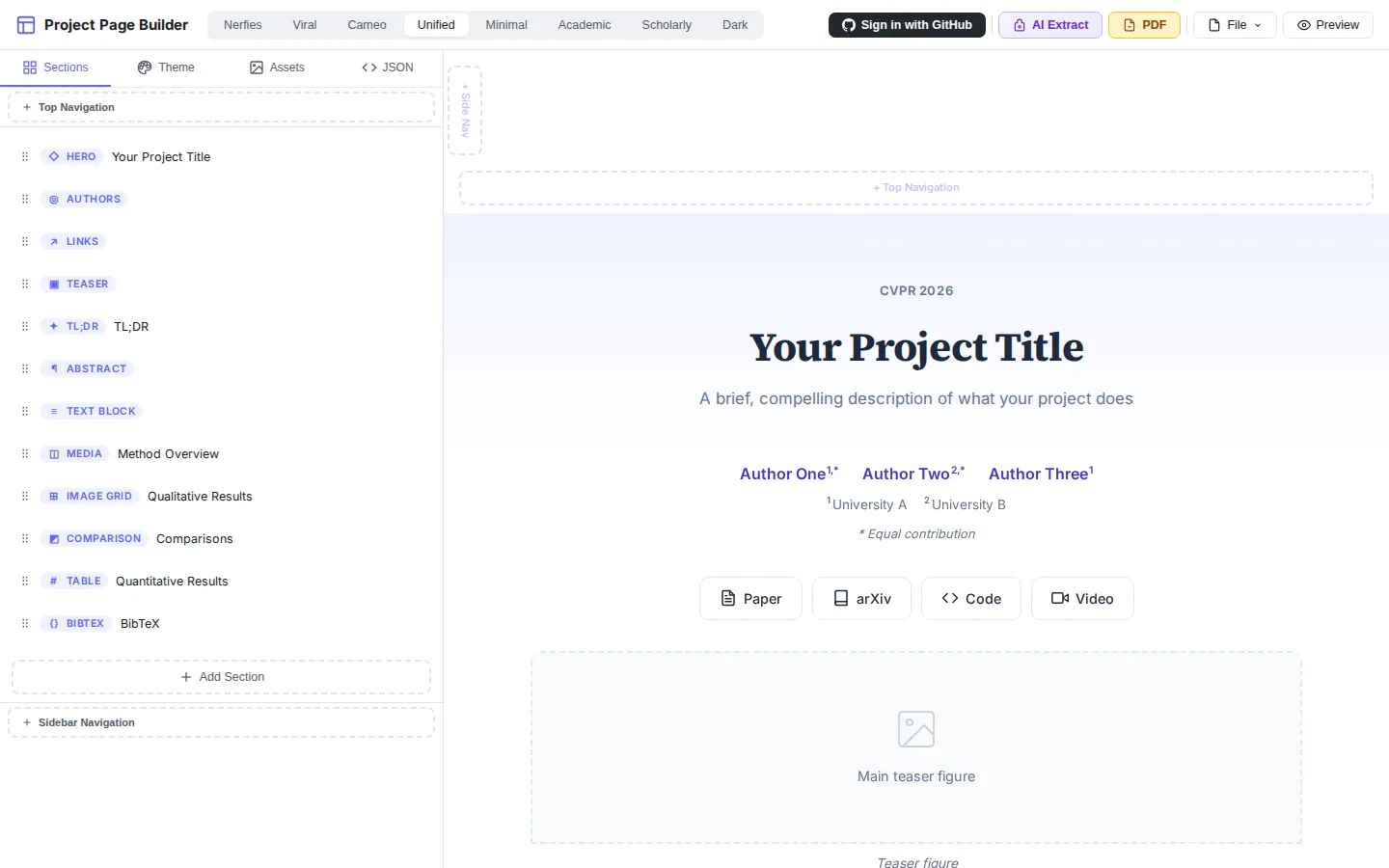
Project Page Builder is a web-based visual editor for creating academic research project pages. Instead of writing HTML/CSS from scratch or forking template repos, researchers can build polished project pages through an intuitive drag-and-drop interface with real-time preview.
Built with React + Vite + TypeScript, the tool is designed to lower the barrier for researchers who want to showcase their work with a professional project page but don’t have extensive frontend experience.
Key Features
Visual Drag-and-Drop Editor
- Drag-and-drop section ordering with dnd-kit
- Real-time preview that updates as you edit
- Floating data editor for inline content editing
- Section-level controls for styling and layout
Rich Section Types
The builder supports 22 section types covering all common elements of academic project pages:
- Hero — title, venue, and description
- Authors — author list with affiliations and links
- Links — paper, arXiv, code, video buttons with customizable styles
- Abstract / TL;DR / Callout — text blocks with styled containers
- Image / Image Grid / Image Comparison / Carousel — visual media with captions and crop editor
- Video / Teaser — embedded video support
- Results Table / Chart — quantitative results with bar, line, scatter, radar, and grouped-bar charts
- Two-Column — side-by-side layout for text and media
- BibTeX — citation block with copy button
- Navigation — top bar or sidebar navigation with scroll-to-section
Theme Templates
8 built-in theme presets inspired by popular academic project pages:
- Nerfies — clean Bulma-inspired layout
- CAMEO — CVLAB-style with accent colors
- Viral — bold and modern
- Unified / Minimal / Academic / Scholarly / Dark — various academic styles
Each theme controls 50+ design tokens: colors, fonts, spacing, border radius, shadow, button style, heading decorations, and more.
LLM-Powered Paper Extraction
A built-in prompt system lets you paste your paper (or extract from PDF with pdfjs-dist) and use an LLM to automatically generate a structured project page JSON. The prompt is carefully designed to:
- Extract the paper’s narrative arc (problem, insight, method, evidence, impact)
- Generate engaging section titles
- Preserve LaTeX math notation
- Structure content into the builder’s section format
GitHub Integration & Deployment
- OAuth sign-in with GitHub
- One-click deployment — generates a static HTML page and pushes to a GitHub repository
- Load from repo — import existing project pages from GitHub
- PR to external repos — push or create pull requests to any accessible repository
Additional Features
- PDF extraction — extract text from uploaded papers
- Image crop editor — built-in image cropping
- LaTeX rendering with KaTeX
- Export as HTML — self-contained single-page output
- Responsive preview at multiple viewport sizes
Tech Stack
| Technology | Purpose |
|---|---|
| React 18 | UI framework |
| TypeScript | Type safety |
| Vite 6 | Build tool |
| dnd-kit | Drag-and-drop |
| KaTeX | Math rendering |
| pdfjs-dist | PDF text extraction |
| Vercel | Deployment |